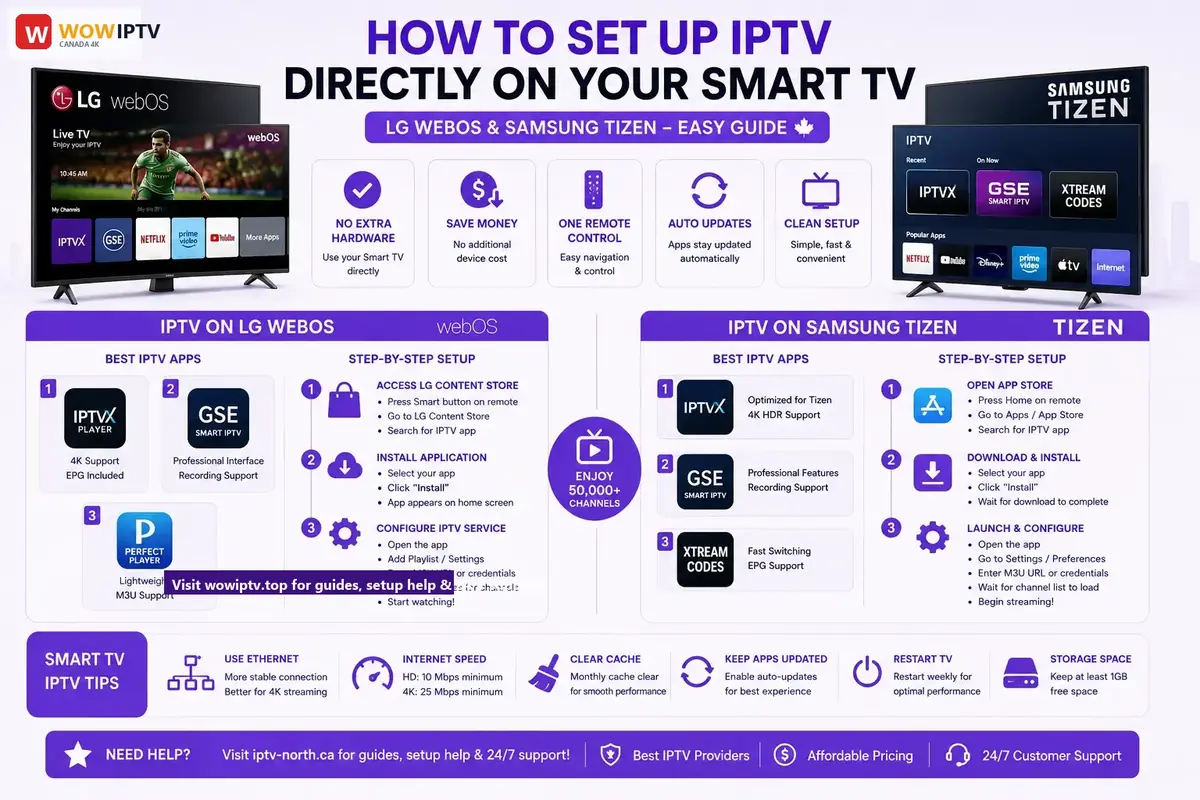
Smart TV Native App Setup for IPTV MN Subscribers
Direct Smart TV Setup for IPTV MN: Samsung & LG
\nNo extra streaming sticks required. Learn how to launch iptvmn directly through your Samsung or LG Smart TV store using verified native apps with instant EPG loading and intuitive remote control navigation.
\n\nDirect setup instructions for built-in operating frameworks including LG WebOS and Samsung Tizen panels allow you to stream IPTV without additional devices like Fire TV or Roku.
\n\n\n\nThis is the most convenient option if your TV supports IPTV apps natively.
\n\n\n\nAdvantages of Built-In Smart TV IPTV
\n\n\n\nPros:
\n\n\n\n- \n
- No additional hardware needed \n\n\n\n
- No extra expense \n\n\n\n
- Direct TV remote control \n\n\n\n
- Automatic app updates \n\n\n\n
- Cleaner setup \n
Cons:
\n\n\n\n- \n
- Limited to compatible TV brands \n\n\n\n
- Fewer app options \n\n\n\n
- Less flexibility than external devices \n\n\n\n
- Older TVs may not support IPTV \n
IPTV on LG WebOS TVs
\n\n\n\nCompatible Models
\n\n\n\n- \n
- LG WebOS 3.0 and newer (2016+) \n\n\n\n
- Most LG Smart TVs manufactured after 2016 \n
Best IPTV Apps for LG WebOS
\n\n\n\n- \n
- IPTVX Player\n
- \n
- Download from LG App Store \n\n\n\n
- 4K support \n\n\n\n
- EPG included \n
\n\n\n\n - GSE Smart IPTV\n
- \n
- Available on LG App Store \n\n\n\n
- Professional interface \n\n\n\n
- Recording capabilities \n
\n\n\n\n - Perfect Player\n
- \n
- Lightweight option \n\n\n\n
- Free to use \n\n\n\n
- M3U playlist support \n
\n
Step-by-Step LG WebOS Setup
\n\n\n\n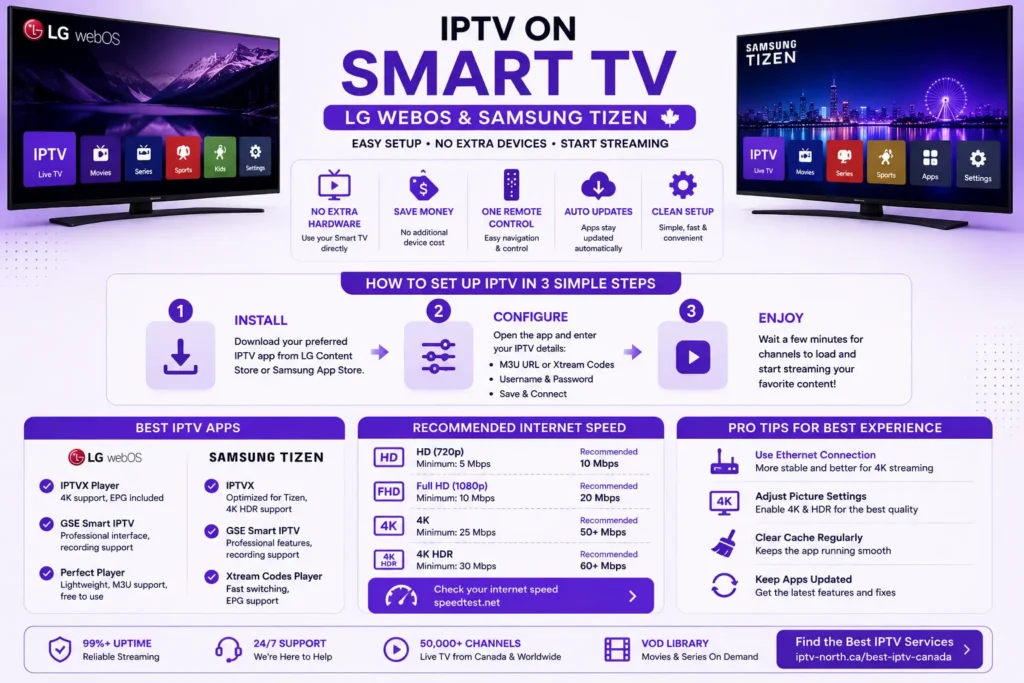
Step 1: Access LG Content Store
\n\n\n\n- \n
- Press the Smart button on your LG remote \n\n\n\n
- Navigate to LG Content Store \n\n\n\n
- Search for desired IPTV app \n
Step 2: Install Application
\n\n\n\n- \n
- Select app from results \n\n\n\n
- Click “Install” \n\n\n\n
- Wait for installation to complete \n\n\n\n
- App will appear on your home screen \n
Step 3: Configure Your IPTV Service
\n\n\n\n- \n
- Open the installed app \n\n\n\n
- Select “Add Playlist” or “Settings” \n\n\n\n
- Enter your IPTV credentials:\n
- \n
- M3U URL or Username/Password \n\n\n\n
- Authorization details \n
\n\n\n\n - Wait for channels to load (typically 1-3 minutes) \n\n\n\n
- Start watching! \n
Troubleshooting LG WebOS IPTV:
\n\n\n\n- \n
- Common issues guide \u2192 \n\n\n\n
- Restart TV if app crashes \n\n\n\n
- Clear app cache (Settings \u2192 Apps \u2192 App Manager) \n\n\n\n
- Check internet speed: Test here \u2192 \n
IPTV on Samsung Tizen Smart TVs
\n\n\n\nCompatible Models
\n\n\n\n- \n
- Samsung Smart TV with Tizen OS (2015+) \n\n\n\n
- All modern Samsung TVs \n
Best IPTV Apps for Samsung Tizen
\n\n\n\n- \n
- IPTVX\n
- \n
- Available on Samsung App Store \n\n\n\n
- Optimized for Tizen \n\n\n\n
- 4K HDR support \n
\n\n\n\n - GSE Smart IPTV\n
- \n
- Professional features \n\n\n\n
- Recording support \n\n\n\n
- Multiple profiles \n
\n\n\n\n - Xtream Codes Player\n
- \n
- Fast switching \n\n\n\n
- Lightweight \n\n\n\n
- EPG support \n
\n
Step-by-Step Samsung Tizen Setup
\n\n\n\nStep 1: Open Samsung Smart TV App Store
\n\n\n\n- \n
- Press Home button on remote \n\n\n\n
- Navigate to Apps \n\n\n\n
- Select “Samsung TV Plus” or “App Store” \n\n\n\n
- Search for IPTV application \n
Step 2: Download and Install
\n\n\n\n- \n
- Select desired IPTV app \n\n\n\n
- Click “Install” \n\n\n\n
- Wait for download completion \n
Step 3: Launch and Configure
\n\n\n\n- \n
- Open the installed app \n\n\n\n
- Tap “Settings” or “Preferences” \n\n\n\n
- Input your IPTV details:\n
- \n
- Playlist URL (M3U) \n\n\n\n
- Username and password \n
\n\n\n\n - Allow app to download channel list \n\n\n\n
- Begin streaming \n
Samsung Tizen IPTV Tips:
\n\n\n\n- \n
- Use ethernet for better stability \n\n\n\n
- Update Samsung TV firmware regularly \n\n\n\n
- Clear app cache monthly \n\n\n\n
- Adjust picture settings for 4K content \n
IPTV App Comparison: Smart TV Edition
\n\n\n\n| Feature | LG WebOS | Samsung Tizen | External Device |
|---|---|---|---|
| Native Support | Excellent | Excellent | N/A |
| App Selection | Good | Good | Excellent |
| 4K Streaming | Yes | Yes | Yes |
| Recording | Yes (select apps) | Yes (select apps) | Depends on device |
| Ease of Setup | Very Easy | Very Easy | Moderate |
| Cost | Free (apps only) | Free (apps only) | 5-250 |
When to Choose Smart TV IPTV vs External Device
\n\n\n\nChoose Built-In Smart TV IPTV if:
\n\n\n\n- \n
- Your TV is LG WebOS or Samsung Tizen \n\n\n\n
- You want simplest setup \n\n\n\n
- You prefer one remote control \n\n\n\n
- You have limited space \n
Choose External Device (Fire TV/Android) if:
\n\n\n\n- \n
- Your TV doesn’t support IPTV natively \n\n\n\n
- You want more app options \n\n\n\n
- You want better performance \n\n\n\n
- You need advanced features like recording \n
Compare all device options \u2192
\n\n\n\nOptimizing Your Smart TV for IPTV Streaming
\n\n\n\nNetwork Setup:
\n\n\n\n- \n
- Use ethernet connection (recommended)\n
- \n
- More stable than WiFi \n\n\n\n
- Better for 4K streaming \n
\n\n\n\n - If WiFi only: Position TV near router \n\n\n\n
- Minimum speed: 10 Mbps (HD), 25 Mbps (4K) \n
Picture Settings for IPTV:
\n\n\n\n- \n
- Navigate to Picture Settings \n\n\n\n
- Set resolution to 4K (if supported) \n\n\n\n
- Enable HDR if available \n\n\n\n
- Adjust color temperature (warm recommended) \n\n\n\n
- Enable motion smoothing for live TV \n
Sound Settings:
\n\n\n\n- \n
- Set to Surround Sound if supported \n\n\n\n
- Adjust volume levels \n\n\n\n
- Enable spatial audio if available \n
Storage and Performance Management
\n\n\n\nRegular Maintenance:
\n\n\n\n- \n
- Clear cache monthly\n
- \n
- LG: Settings \u2192 Apps \u2192 App Manager \u2192 Select app \u2192 Clear Cache \n\n\n\n
- Samsung: Settings \u2192 Apps \u2192 Select app \u2192 Storage \u2192 Clear Cache \n
\n\n\n\n - Uninstall unused apps \n\n\n\n
- Keep apps updated \n\n\n\n
- Restart TV weekly \n
Monitor Storage:
\n\n\n\n- \n
- LG WebOS: Settings \u2192 Storage \n\n\n\n
- Samsung Tizen: Settings \u2192 Apps \u2192 Storage Usage \n\n\n\n
- Keep at least 1GB free space available \n
Internet Connection Optimization
\n\n\n\nSpeed Requirements by Content Type:
\n\n\n\n| Quality | Minimum Speed | Recommended |
|---|---|---|
| HD (720p) | 5 Mbps | 10 Mbps |
| Full HD (1080p) | 10 Mbps | 20 Mbps |
| 4K | 25 Mbps | 50+ Mbps |
| 4K HDR | 30 Mbps | 60+ Mbps |
Test your internet speed \u2192
\n\n\n\nCommon Smart TV IPTV Issues & Solutions
\n\n\n\nProblem: Channels won’t load
\n\n\n\n- \n
- Check internet connection \n\n\n\n
- Verify IPTV credentials \n\n\n\n
- Restart the IPTV app \n\n\n\n
- More troubleshooting \u2192 \n
Problem: App crashes
\n\n\n\n- \n
- Update app from store \n\n\n\n
- Clear app cache \n\n\n\n
- Restart smart TV \n\n\n\n
- Reinstall application \n
Problem: Buffering/Freezing
\n\n\n\n- \n
- Check internet speed \n\n\n\n
- Restart modem and TV \n\n\n\n
- Full buffering guide \u2192 \n\n\n\n
- Switch to lower quality option \n
Problem: No sound
\n\n\n\n- \n
- Check TV volume \n\n\n\n
- Verify app audio settings \n\n\n\n
- Test with different channel \n\n\n\n
- Check HDMI connection \n
Premium Features Available on Smart TVs
\n\n\n\nRecording (where supported):
\n\n\n\n- \n
- Set up scheduled recordings \n\n\n\n
- Pause and resume live TV \n\n\n\n
- Access recorded content anytime \n
Multi-user Support:
\n\n\n\n- \n
- Create separate profiles \n\n\n\n
- Personalized channel lists \n\n\n\n
- Individual settings per user \n
Screen Mirroring:
\n\n\n\n- \n
- Cast from phone to TV \n\n\n\n
- Wireless connection \n\n\n\n
- Second screen functionality \n
Best IPTV Services for Smart TVs
\n\n\n\nWhen choosing an IPTV service for your Smart TV, verify:
\n\n\n\n- \n
- \u2713 Compatible with your TV’s operating system \n\n\n\n
- \u2713 Apps available on LG/Samsung App Store \n\n\n\n
- \u2713 50,000+ channels minimum \n\n\n\n
- \u2713 4K support \n\n\n\n
- \u2713 Reliable 99%+ uptime \n
Smart TV IPTV FAQs
\n\n\n\nQ: Do I need to pay for IPTV apps on Smart TV?
A: Most are free, though some offer premium features. See pricing \u2192
Q: Can I use older TV models with IPTV?
A: Only if they have built-in Smart TV features and support apps.
Q: Is it safe to install IPTV apps on my Smart TV?
A: Yes, if using official app stores. More security info \u2192
Q: Can I update IPTV apps automatically?
A: Yes, enable auto-update in LG/Samsung App Store settings
Q: How often should I restart my Smart TV?
A: Recommended weekly for optimal performance
Getting Started Today
\n\n\n\n- \n
- Check if your Smart TV supports IPTV apps\n
- \n
- LG WebOS 3.0+ or Samsung Tizen \n
\n\n\n\n - Choose an IPTV provider \u2192 \n\n\n\n
- Check pricing options \u2192 \n\n\n\n
- Download recommended app \n\n\n\n
- Follow setup instructions above \u2192 \n\n\n\n
- Contact support if needed \u2192 \n
Conclusion
\n\n\n\nBuilt-in IPTV on modern Smart TVs is the most convenient streaming solution. Whether you own an LG or Samsung TV, setting up IPTV directly is quick and straightforward.
\n\n\n\nRecommended next steps:
\n\n\n\n- \n
- Compare IPTV services \u2192 \n\n\n\n
- View pricing plans \u2192 \n\n\n\n
- Get tech support \u2192 \n
Ready to start streaming? Explore our complete channel lineup on the IPTV MN official homepage or choose your preferred plan on our IPTV subscription pricing page with instant 5-minute activation.